Buy Now

Accessibility Advances in Auralia & Musition

As music programs continue to diversify, accessibility is a core requirement of responsible curriculum design. With new education accessibility regulations coming into force across multiple regions over the next 12–24 months, institutions are being asked to demonstrate that their digital learning tools meet modern standards for screen reader compatibility, keyboard navigation, alternative text, and equitable assessment pathways.

Music theory and aural skills platforms have historically lagged behind other disciplines in accessibility, largely due to the complexity of notation, audio‑first tasks, and interactive interfaces. That’s why the latest accessibility updates in Auralia & Musition represent such an important step forward for higher education.

The externally audited Auralia Musition VPAT is always publicly available.  Accessibility work is ongoing and baked into our development processes. We welcome all feedback and comments.
Meeting the New Accessibility Requirements


Across the USA, UK, Canada, Australia and EU, tertiary institutions are preparing for updated accessibility mandates aligned with WCAG 2.1 / 2.2 AA.  Many of these requirements become enforceable for education providers in the coming academic cycles, with some deadlines approaching in 2026.  These WCAG frameworks emphasise:

  • Full screen reader compatibility
  • Keyboard‑only navigation
  • Meaningful alternative text for images and notation
  • Equitable access to assessments and learning materials
  • Clear accommodations pathways for students with disabilities

Auralia & Musition’s latest updates directly support these expectations, giving instructors and administrators confidence that their core musicianship tools are aligned with emerging compliance standards.

Revised and Expanded Screen Reader Support

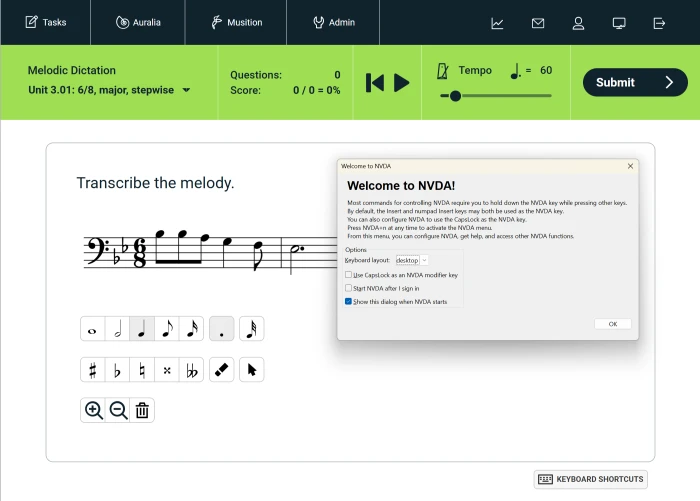
Screen reader compatibility has been significantly strengthened.  Auralia & Musition now provide clearer, more consistent navigation for blind and low‑vision students using tools such as JAWS, NVDA, and VoiceOver. Students can move through exercises using the Tab key, with interface elements announced reliably and predictably.

This builds on earlier improvements - such as descriptive text for interface elements and structured navigation - and now offers a smoother, more intuitive experience for learners who rely on assistive technology.

Welcome to NVDA image

Instructor‑Defined Alternative Text for Questions and Content

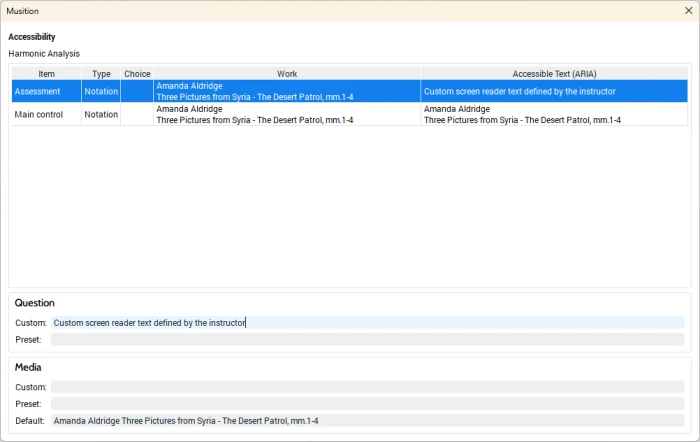
One of the most important new features is the ability for instructors to add custom alternative text to questions, notation examples, and other visual content.  This allows educators to:

  • Provide meaningful descriptions of notation, diagrams, or images
  • Tailor explanations to the specific learning context
  • Ensure that assessments remain equitable and pedagogically aligned
  • Support students who use braille displays or audio‑only workflows

Rather than relying on generic or automated descriptions, instructors can now craft alt text that reflects the musical nuance of the task - whether it’s a harmonic progression, a rhythmic dictation prompt, or a melodic excerpt.

Image - Custom screen reader text defined by the instructor

Overhauled Notation with Full Keyboard Entry

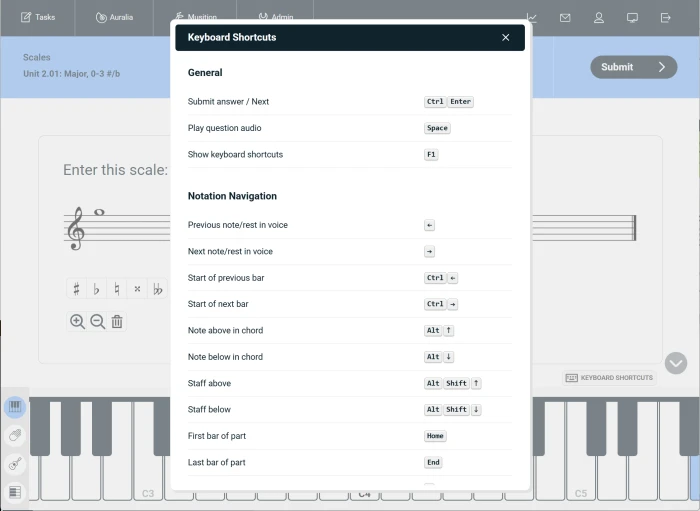
Perhaps the most transformative update is the complete rebuild of the notation engine to support comprehensive keyboard‑based entry.  Students can now:

  • Enter rhythms, pitches, and symbols entirely via keyboard
  • Navigate notation elements without a mouse
  • Control playback, submission, and navigation through shortcut commands

This overhaul not only improves accessibility for blind and low‑vision learners but also benefits students with motor impairments, those working on laptops without pointing devices, and anyone who prefers a faster, more tactile workflow.

Image - Keyboard shortcuts

Continued Support for Braille Workflows via MusicXML Export

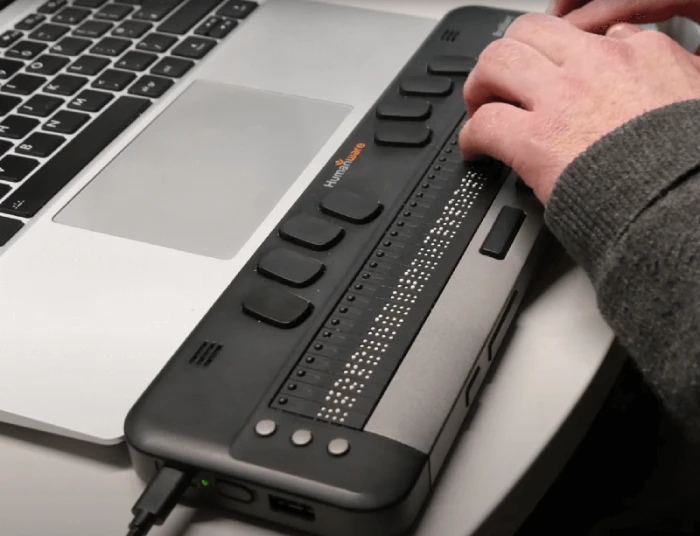
Auralia & Musition continue to support MusicXML export, allowing students to open notation in programs like MuseScore, where braille display features or braille terminals can be used. This workflow remains essential for students who prefer or require braille‑based music reading.

Image - Braille terminal

Why These Updates Matter for Tertiary Music Programs


For higher education instructors, these improvements offer several key benefits:

  • Compliance readiness as accessibility regulations tighten
  • Equitable assessment, ensuring all students can demonstrate musicianship skills
  • Reduced administrative burden, with built‑in accommodations tools
  • Greater flexibility in designing inclusive learning pathways
  • Improved student confidence and independence, especially for blind and low‑vision musicians

Most importantly, these updates reflect a broader shift: accessibility is not an add‑on but a fundamental part of musicianship education.

Looking Ahead


As accessibility requirements continue to evolve, Auralia & Musition are positioning themselves as leaders in inclusive music education technology. For tertiary institutions, adopting tools that meet these standards is not only a compliance requirement—it’s a commitment to supporting every musician’s learning journey.

If your department is reviewing accessibility across its digital platforms, now is an ideal time to explore these updates and consider how they can strengthen your curriculum.

Please get in touch if you have any questions.