
Musition Tour
Introduction to Musition
Interactive drill-based teaching makes learning music theory online highly engaging and fun! Regardless of your musical style, the music theory exercises in Musition® will help you reinforce and expand your knowledge, making you a better musician.
Musition is easy to use and is perfect for beginners and advanced students!
Designed for educators
- Excellent content & curriculum
- Quizzes, worksheets, exams
- Student tracking & grading
- Easily customisaable
- Cost effective
- LMS integration
Practising
Musition has 61 music theory topics, each with carefully sequenced levels that gradually introduce students to more difficult content. This approach allows you to use Musition with beginners and advanced students, with each student learning at their own pace.
Levels and topics are grouped into syllabuses, which are mapped to curriculum. Teachers can very easily create their own syllabus, ensuring that students practice the most relevant content.
- Self paced learning
- High quality feedback
- Tapping, multiple choice and notation entry
- Automatic grading
- Complete reporting
- Syllabus and topic customisation
When a student answers incorrectly they always receive quality feedback, giving them the chance to review the question and their answer.
This will often include playback as well as notation and text explanations.

The way questions are answered varies from topic to topic. Some may ask to tap back a rhythm whilst others may simply require a multiple choice answer. Notation entry is widely used, and there are also Solfege, Piano and Guitar controllers available in many topics.

Content
The library has thousands of questions for your students to practise, using quality audio recordings and notation excerpts. Import your own items, and use them to create your own questions that are relevant for your students studies.

Question creation is very flexible, with excellent control over how content is displayed and played back to the student.
- Notation entry – transcription & dictation
- Notation highlighting – notes, bars and parts
- Chord symbol entry – figured or contemporary
- Multiple choice – text, image, audio or notation answers
- Tapping – imitation, reading & tap along
- Free text - text based answers, essays & analysis
- Creative - harmony & composition
Notation
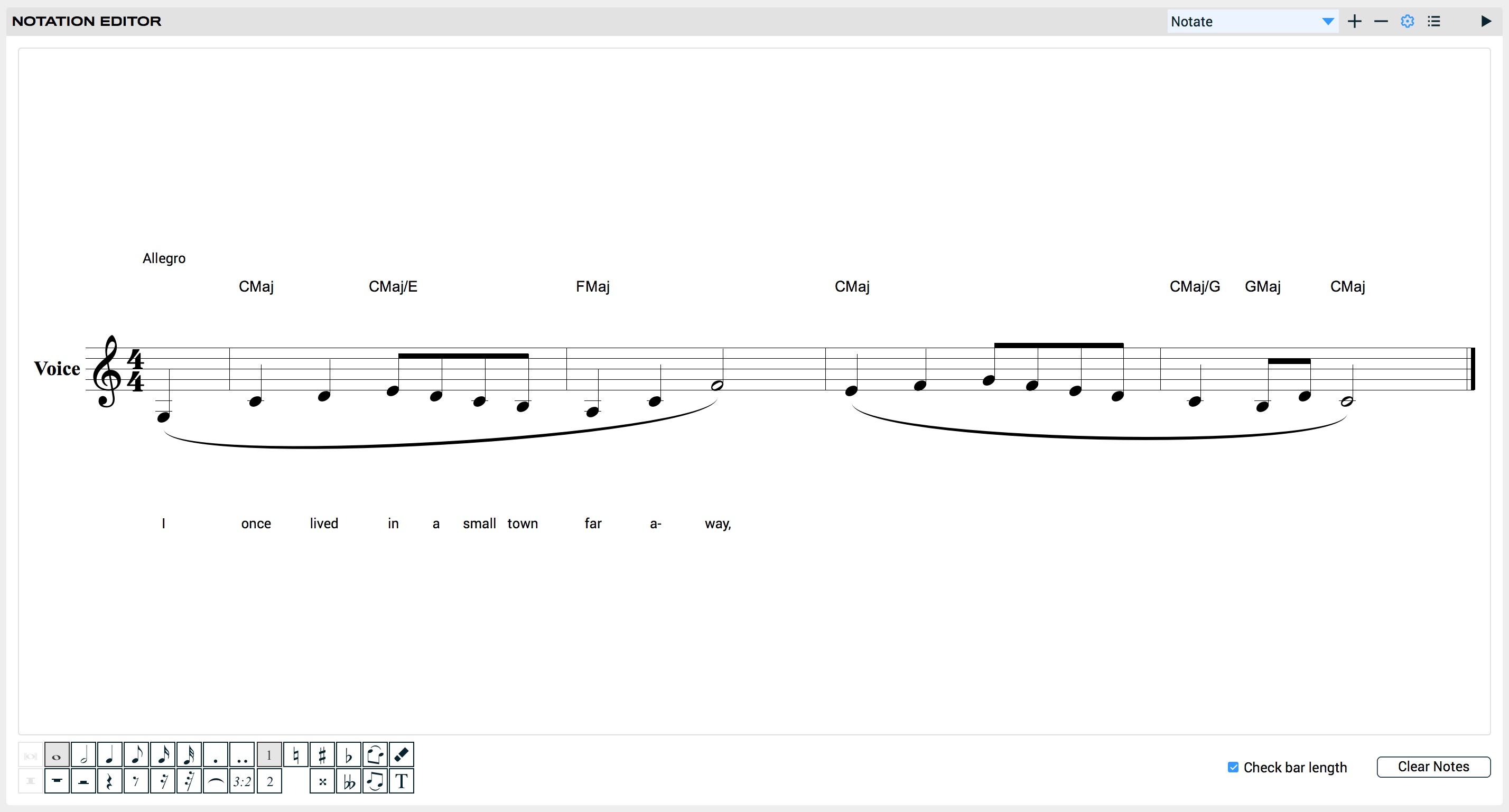
Musition also features an integrated notation editor. Unlimited parts and bars, control over beaming and grouping, anacrusis support and ties allow you to create examples quickly and easily.
You can even import and export MusicXML, allowing you to reuse any existing notation that you may have.
Learning with Musition
Each of the topics in Musition has an accompanying Lessons module, where you can learn about the concepts that you will be practising. Lessons contain text, audio recordings and notation and are an invaluable electronic textbook both at home and in the classroom.


Quizzes, Worksheets & Exams
Tests are one of the most important features in Musition. They allow teachers to assign sequences of questions; giving absolute control over the number and type of questions that students will attempt.
When integrated into your curriculum, tests rapidly become and invaluable part of your workflow.
- Weekly worksheets
- Entrance examinations
- Quizzes
- Formal assessments
When creating tests, questions may come from any syllabus and topic, or, directly from the library. Scores are stored separately and tests can be taken multiple times if required.
Tests have loads of features that allow them to be tailored to your exact requirements.
- Question banks
- Time limits
- Playback controls
- Timeslots - starting and ending dates
- Weighting and rounding of marks
- Multiple attempts and session resumption
- Question threading
- Automatic & manual grading, regrading
- LMS integration


Courses
Courses are sequenced pathways that include questions and lessons. When setting questions in courses, the teacher can set thresholds that must be hit before a student can progress to the next stage.
Instructors generally use courses for longer learning activities, and are great for delivering curriculum relevant content.

Musition in the Classroom
Using Musition with your students has two key benefits. Students have unlimited ear training questions to practise, and, as the teacher, you save hours upon hours of preparation and grading time.
Student work is all recorded automatically, content can be customised to suit your curriculum, and you can very easily assess large numbers of students.
- Student scores and progress recorded
- Automatic grading and assessment
- Easy creation of worksheets, quizzes and tests
- Flexible and comprehensive administration tools
- Cloud connected for on and off campus use
- iPhone, Android, iPad, Chromebook, Mac, Windows
- LMS integration - sign on and gradebook support

Music to our ears

Jonathan Rice, Music Coordinator at St Aloysius
“We use Auralia and Musition to assist with exam preparation, to track students’ progress and set worksheets, and I’ve noticed a reduction in my marking load since we introduced these programs.”
Michael Martin, Music Teacher at Rugby School
“The students often use Auralia and Musition to prepare for exams, especially theory exams. Students are more engaged and this, in turn, leads to better results. I’ve noticed real improvement in students’ results, especially intervals and chords.”
Tim de Jong, Head of Music Department at Walford Anglican School for Girls
“I have used the software to set worksheets and track students’ progress. I think that there has been an improvement in students’ test result and their musicianship with Auralia and Musition.”